Cimetrix Incorporated

Software Solutions for Factory Connectivity and Advanced Motion Control

| Products | Services | Support | Resources | News | About Cimetrix | Investors
Home | Search | Contact Us |

Introduction to the SEMI EDA Standards

This document is an introduction to the SEMI Equipment Data Acquisition (EDA also known as Interface A) standards. It is also available in PDF format. This document include the following sections:

Overview

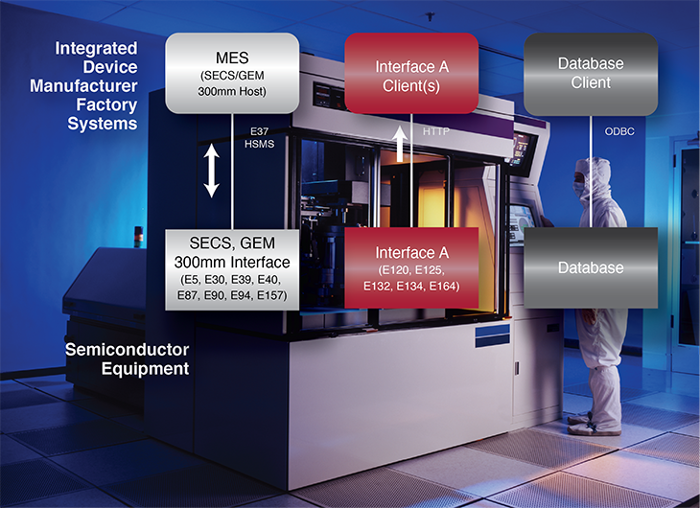
The Equipment Data Acquisition (EDA also known as Interface A) Standards are a collection of SEMI standards for the semiconductor industry to improve and facilitate communication between IC Maker’s data gathering software applications and the factory Equipment. When implemented together, these standards provide a convenient interface for Equipment Data Acquisition using SOAP/XML messages over an HTTP or HTTPS connection. The main EDA SEMI standards include E120, E125, E132, and E134. Solutions must comply with the specific SOAP/XML implementations of these standards; E120.1, E125.1, E132.1, and E134.1.

EDA provides multiple client access to data gathering capabilities. It does not purport to replace the SEMI GEM/SECS standards (E4, E5, E30, and E37) or the SEMI 300mm standards (E39, E40, E87, E90, E94, and E116) since EDA does not provide any features for Equipment control or configuration. Instead, EDA must be supported in addition to other required interfaces. Over time, EDA could replace the need for any other data providing interfaces so that IC Makers only require the EDA and SECS/GEM/300mm connectivity standards. In practice, some initial EDA deployments may provide little more data than the SECS/GEM interface, but eventually it is expected to provide more data—particularly state information, sensor feedback, actuator states, and other raw data necessary for process, product and equipment analysis. All data must be supplied to EDA as directly from the source as possible with minimal software layers. In order to make all expected data available and achieve performance expectations, some equipment will require internal restructuring and architectural changes.

During 2005 and 2006 IC Makers started requiring integrated EDA solutions from the Equipment Suppliers. The demand will continue to increase as IC Makers roll out plans to improve yield and equipment utilization. Equipment Suppliers must begin development as soon as possible in order to meet these deadlines and provide a quality solution.

Terminology and Acronyms

Term or Acronym Description
3507 ID for E132 during the Task Force development stage.
3509 ID for E134 during the Task Force development stage.
Access Control List (ACL) Part of E132, the Client Authorization details that grant or deny Client sessions and impose restrictions on Clients access to specific Interface A information and operations.
CEM E120.1 XML Schema for the Common Equipment Model
Client Authentication In order for an Interface A Client to gather data, E132 requires clients to first establish a session. The client must provide credentials to the Interface A Server. The Interface A Server must be preconfigured to grant the client permission (based on the credentials) to establish a session.
Client Authorization Part of E132, before the Interface A Server accepts an operation request from the Client, the Server must verify that the Client has permission. These permissions are preconfigured in the Server using Access Control Lists.
Client Consumer An Interface A Client that receives the Data Collection Reports and other E134 consumer operations.
Client Manager An Interface A Client that establishes a session, identifies the Consumer to receive the data, sets up Data Collection Plans, and uses other E134, E132, and E125 manager operations.
Data Collection Plan (DCP) Part of E134, a data gathering request that includes a set of Events (with a configurable set of Parameters), Exceptions (with a fixed set of Parameters), and Traces (with a configurable set of Parameters). After successfully creating a Data Collection Plan, it must be activated. Then the Client will receive the respective Data Collection Reports as configured in the plan.
Data Collection Report (DCR) The Equipment sends the requested data in this standard format.
DCM E134.1 Provisional Specification for SOAP Binding of Data Collection Management
ECA E132.1 Provisional Specification for SOAP Binding for Equipment Client Authentication and Authorization
EDA Equipment Data Acquisition. The combination of SEMI standards E120, E125, E128, E132, E134 and E138. This term is more common the term “Interface A”, but both refer to the same thing. Of course, the EDA acronym is also used in the semiconductor industry to stand for Electronic Design Automation, but this is unrelated to this document or the referenced SEMI standards.
Equipment Equipment refers to the hardware and software received from Equipment Supplier to perform work for the IC Maker. In some context of Interface A, Equipment refers to the Interface A Server that represents the hardware and software to the Clients.
ESDS E125.1 Provisional Specification for SOAP Binding for Equipment Self Description
Exception Part of E134, an Equipment alarm, error, or warning notification.
Event Part of E134, a notification that something important occurred on the Equipment tied to a state machine. An Event request in a DCP can include any set of Parameters.
FF Fire-and-Forget where a message sender does not expect a reply message.
Host The software an IC Maker is running to communicate with the Equipment. A host typically refers to the SECS/GEM connection but could also refer to a client using Interface A.
HTTP HyperText Transfer Protocol: the protocol for moving hypertext files across the Internet. Requires a HTTP client program on one end, and an HTTP server program on the other end. HTTP is the most important protocol used in the World Wide Web (WWW)
HTTPS HyperText Transport Protocol (Secure): the standard encrypted communication mechanism on the World Wide Web. This is actually just the use of Netscape's Secure Socket Layer (SSL) as a layer under its regular HTTP application layering.
Interface A The resulting Equipment interface when SEMI standards E120, E125, E132, and E134 are implemented together. Interface A is also known as EDA.
Interface A Client Software that attempts to use the Equipment’s Interface A by establishing a session. Typically, this is developed by the IC Maker or a third party hired by the IC Maker. Equipment suppliers can also develop Interface A clients, such as for capturing diagnostic information. This is also called an EDA Client.
Interface A Server The Equipment software that implements the Interface A standards. This software should be installed on the Equipment’s internal computer and fully integrated into the Equipment’s system. However, the software can be run on an external computer to retrofit Equipment that does not have an integrated solution. This is also called an EDA Server or EDA Web Server.
Interface B A collection of SEMI standards to implement data sharing between applications (primarily IC Maker applications), such as Statistical Process Control and Run-To-Run applications.
Interface C A collection of SEMI standards to allow remote access to Equipment data. This is intended primarily for Equipment Suppliers to remote obtain the Equipment's diagnostic and maintenance information.
Metadata Information that describes the data, such as when an Event occurs or the interpretation of a Parameter's value.
Operation An Interface A transaction, method, or message initiated by an Interface A client or server. Each operation has a name, well-defined format and meaning. E125, E132, and E134 each define a set of operations for the client and server.
Parameters The set of data available for gathering from the Equipment's Interface A connection.
PR8 Proposed Standard for the Equipment Data Acquisition: a previous name for the E134 standard.
RR Request-Response where a message sender expects a reply message.
Security Admin A part of E132, Security Admin is a utility provided with the Interface A Server to provide administrative configuration.
Session Also called an Authenticated Session, a session is established between the Server and Client by following the E132 procedures. Once a session is established, the Client can send authorized operation messages.
SOAP Simple Object Access Protocol (SOAP): In order to make the Interface A standards easier to implement, they use the SOAP protocol. It is a lightweight protocol for exchange of information in a decentralized, distributed environment. It is an XML based protocol that consists of three parts: an envelope that defines a framework for describing what is in a message and how to process it, a set of encoding rules for expressing instances of application-defined datatypes, and a convention for representing remote procedure calls and responses. SOAP can potentially be used in combination with a variety of other protocols; however, the only bindings defined in this document describe how to use SOAP in combination with HTTP and HTTP Extension Framework. See www.w3.org/TR/2000/NOTE-SOAP-20000508 information.
Tool A synonym for Equipment. The term Equipment is used more frequently in the standards.
Trace Data polling performed by the Equipment as defined by the Client. The Client defines the polling frequency, the set of polled Parameters, and the conditions to start and stop polling.
UML Unified Modeling Language (UML): All of the Interface A standards use UML notation for all class diagrams and for object oriented diagrams provided as examples. UML is a notation for representing object-oriented designs and views created by Booch, Rumbaugh, and Jacobson in order to merge their three popular notations plus aspects of other existing notations into a single object-oriented notation intended to be usable by all. UML is an open modeling language to specify, visualize, design, and document models of software systems. See www.uml.org or www.omg.org/technology/documents/modeling_spec_catalog.htm for more information.
XML Extensible Markup Language: A markup language used for representing data rich with context and content in documents and in communications. XML is an extension of SGML, a document-oriented markup language. It was created by W3C for use on the Internet. See www.w3.org/TR/REC-xml for more information.
XML Schema An XML Schema defines the structure, content and semantics of XML documents.

SEMI Standards

EDA comprises of multiple SEMI standards including the following. All of these are available for download from the SEMI website for a fee, http://www.semi.org.

E120 Specification for the Common Equipment Model (CEM)

E120 provides a general object model that represents an external view of Equipment. The model is composed of various classes organized in a logical hierarchy. A fully-implemented model summarizes all of the Equipment's major hardware and software components. SEMI standard E120.1 XML Schema for the Common Equipment Model (CEM) maps the E120 standard into a specific XML implementation.

E120 defines the following concrete classes.

Class Description
Equipment Models the equipment as a whole and contains MaterialLocations, Modules, Subsystems and IODevices.
Module Models a major equipment subsystem that can process material like a process or inspection chamber. It may contain MaterialLocations, Modules, Subystems and IODevices.
Subsystem Models a major equipment subsystem that cannot process material like a load port or prealigner. It may contain MaterialLocations Subsystems, and IODevices.
IODevice Models sensors, actuators or intelligent actuator or sensor devices.
MaterialLocation Models the ability of an equipment component to hold material, specifying the material type as Carrier, Substrate, or ProcessDurable.

E120 also defines the following additional concrete and abstract classes.

Class Description
SoftwareModule Describes the existence and version of software that is in use on the equipment and on equipment components. The software might be supplied by the equipment manufacturer or a third party. Attributes identify the supplier, version and a description.
EquipmentElement The basic information required for each hardware component, such as an AbstractModule, Subsystem or IODevice. Attributes identify the supplier, make, model, role, revision, and (if applicable) serial number.
AbstractModule A subclass of EquipmentElement that models the parts of the equipment structure capable of processing material; namely Modules and Equipment. The attributes specify the process type as Measurement, Process, Storage or Transport and specifies the recipe type.
Nameable The root of every class to provide unique identification and a description for each component.
Extension Provides the ability for other standards and specific implementations to extend the CEM.

E125 Specification for Equipment Self Description (EqSD)

The E125 standard allows clients to request helpful descriptions about all information available for data gathering include the parameters (specific data, units, and types), events, exceptions, state machines, SEMI E39 data, and physical configuration. All of the available information is mapped into the E120 Common Equipment Model object hierarchy. SEMI standard E125.1 Provisional Specification for SOAP Binding for Equipment Self Description (ESDS) maps the E125 standard into a specific SOAP/XML implementation.

This standard allows the end-user to know information about what data can be monitored on the Equipment and the context (i.e. process chamber #1 or #2) without having to entirely rely on the Equipment's documentation. Interface A clients can implement plug-and-play methodology, automatically utilize new information immediately after an Equipment's interface is revised, and implement graceful error recovery if data is unavailable unexpectedly.

E125 defines an interface with client-initiated operations to query the Equipment’s available metadata information.

Operation Description
GetUnits Retrieve all available unit definition information.
GetTypeDefinitions Retrieve all available type definition information.
GetStateMachines Retrieve all available state machine information and the associated events.
GetSEMIObjTypes Retrieve all available SEMI E39 information.
GetExceptions Retrieve all available exception information.
GetEquipmentStructure Retrieve all SEMI E120 Common Equipment Model information. Each component in the Equipment structure is a node.
GetEquipmentNodeDescriptions Retrieve one or more Equipment node descriptions including the associated state machines, SEMI E39 information, exceptions, and parameters. A parameter represents an element of data that can be gathered. Its attributes describe it meaning, how the value is changed, unit, and the type (integer, real, string, array, enumeration, or some other composite type).
GetLatestRevision Retrieve the date and time the available metadata information changed.
NotifyOnRevisions Request the Equipment to send notification when any metadata availability changes.

E125 also defines an equipment-initiated operation for consuming clients.

Operation Description
MetadataRevised Notify the client that the Metadata in the Equipment Model has changed if NotifyOnRevisions is enabled.

E132 Specification for Equipment Client Authentication and Authorization

E132 defines two related security features for Interface A messaging, Client Authentication and Client Authorization. Client Authentication determines how the client establishes a session before it can do anything else. Client Authorization manages what the client can access after the session is established. The Equipment must provide a Security Admin, a utility that provides administrative configuration, for setting up the Client Authentication and Authorization after installation in the fab. SEMI standard E132.1 Provisional Specification for SOAP Binding for Equipment Client Authentication and Authorization (ECA) maps the E132 standard into a specific SOAP/XML implementation.

In order for an Interface A Client to establish a session where it may use E125 or E134 service requests, the client must provide credentials and be authenticated and the Equipment must be in the ALLOWED Session Establishment state. Credentials include a client ID, an encrypted session key, and an encrypted client ID proof-of-identity key. Any attempts to use services requested before the authentication are rejected. Once the session is established, and then the client authorization becomes effective based on the client's credentials while establishing the session.

The Session interface includes the following client-initiated operations.

Class Description
PersistSession Request the Equipment to maintain the session, even after shutting down the Equipment.
SessionPing A check to see if the Equipment is still active.
CloseSession Request to terminate the session.
EstablishSession Request to establish a new authenticated session and to set the client endpoint, the consumer for all notifications from the equipment.

Authorization is configured using Access Control Lists (ACL). An ACL is a collection of ACL Entries where each entry gives the client access permission to something in the interface. The E132 standard uses the terms principal, a client defined in the ACL, and privilege, permission to use an operation or access specific data. In practice, the easiest way to setup the ACL is by defining what E132 calls roles and then assigning clients to one or more roles. For example, it might be convenient to define "Operator", "Technician", and "Manufacturer" roles. Then Interface A client applications can be assigned to these roles to give them access the appropriate access level.

Each time a client sends a privileged E125 and E134 service request, the Equipment must check whether or not the client is authorized. The ACL assigned to the client determines the set of available E125, E132, and E134 operations, the set of available MetaData, and the access level to data collection plans defined by other clients.

E132 also defines some equipment-initiated operations for consuming clients.

Class Description
SessionPing Used by the equipment to check if the client is still active.
SessionFrozen Notification to the client that the session will be frozen.
SessionClosed Used by the equipment to close an active session.

The Security Admin interface includes the following operations. Only one active Security Admin session is allowed at a time.

Operation Description
GetDefinedPrivileges Request the list of all defined privileges.
GetACL Request the list of all defined Access Control List entries
AddACLEntry Add a new ACL entry
DeleteACLEntry Delete an existing ACL entry
GetActiveSessions Request the list of information on all active sessions
SetMaxSessions Sets the maximum number of active sessions
GetMaxSessions Requests the maximum number of active sessions

E134 Specification for Data Collection Management

The E134 standard defines several methods for Interface A Clients to acquire the data described by the E125 information. A client can request data ad-hoc where the requested set of data is returned immediately. Typically, however, the client will define Data Collection Plans (DCP) to configure the desired data gathering. Once DCP are activated, the Equipment continuously sends fire-and-forget Data Collection Reports (DCR) as the data becomes available. In order to optimize data transmission efficiency, clients can enable the optional buffering so that the DCR are buffered at the Equipment and transmitted periodically at the end of each buffering interval. If the ACL allows, clients can activate DCP defined by other clients. E134 also defines how to manage Data Collection Plans when either the Equipment or client shuts down and restarts so the data collection setup can be persisted. SEMI Standard E134.1 Provisional Specification for SOAP Binding of Data Collection Management (DCM) maps the E134 standard into a specific SOAP/XML implementation.

A Data Collection Plan can include any number and combination of Traces, Events, and Exceptions to report when the DCP is activated.

Traces, Events, and Exceptions that are not listed in activated Data Collection Plans are not sent to any clients. Therefore, the Equipment Supplier determines how much data is available, but the clients determine how much data is actually gathered and reported. Bandwidth requirements depend on the number of clients, the number of activated DCP, the number of Events, Exceptions, and Traces in each DCP, the number of Earameters defined for each Event and Trace, the frequency of activated Events and Exceptions, and the frequency of Trace data collection. Therefore the Interface A bandwidth requirements are difficult to determine. Clients can potentially submit enough data collection requests to overload the Equipment's computer and affect the Equipment's throughput. Therefore E134 defines a Performance Status method to notify consumers of an overload condition and allows the Equipment to take appropriate action like disabling certain DCPs or all of the data collection.

E134 defines the following client-initiated operations:

Operation Description
DefinePlan Submit a Data Collection Plan
GetDefinedPlanIds Request a list of all Data Collection Plan IDs.
GetPlanDefinition Retrieve the definition of a Data Collection Plan
ActivePlan Activate the defined DCP
GetActivePlanIds Request a list of all activated DCP IDs
DeactivatePlan Deactivate the DCP
DeletePlan Delete a DCP
GetParameterValues Ad-hoc request to retrieve the current values of one or more E125 parameters.
GetObjTypeInstanceIds Request a current list of unique instance IDs for one or more E39 ObjTypes.
GetCurrentPerformanceStatus Retrieve the current Equipment performance status.

E134 also defines the following equipment-initiated, Fire-and-Forget operations.

Operation Description
NewData Data Collection Report from an active DCP
PerformanceWarning The Equipment detected a performance degradation. .
PerformanceRestored The Equipment has detected a return to normal conditions.
DCPDeactivation Notification that an active DCP for that consumer is deactivated.
DCPHibernation Notification when one or more persisted DCP are put into the hibernation state as part of Equipment shutdown.

Interface A Client Operations

The following image demonstrates the basic operational flow using all of the Interface A standards.

Initially, each client must establish a secure, authenticated session. Next the client can ask for the Equipment Model metadata information to see what data is available through Interface A. With this information client can define and activate data collection plans. The Equipment will continue to generate Data Collection Reports until the client deactivates the plans or becomes unavailable. When shutting down properly, the client should close the session.

Frequently Asked Questions (FAQ)

Where can I get more information?

More information is available from the following websites.

Will the Interface A standards change over the next few years?

The Interface A standards are relatively new and have been prototyped only in a narrow set of applications. As the standards become adopted by a wide variety of Equipment Suppliers and utilized by IC Makers in diverse applications, the Interface A standards will undergo significant scrutiny. The standards will adapt to the needs of the semiconductor community and mature over time. Anyone who implements the Interface A standards must plan to dedicate resources to follow the standards and migrate with the inevitable changes.

Why use Interface A instead of SECS/GEM for data gathering?

Here are a few reasons. SECS/GEM has its merits, too, but they are not listed here.

SECS/GEM Interface A
SECS/GEM requires support for only one client connection. IC Makers cannot run several data gathering applications at the same time without an infrastructure to share the data. Interface A requires support for multiple concurrent clients. Independent clients can simultaneously use Interface A.
SECS/GEM is only partially self-describing and therefore relies on good documentation. IC Makers have complained that the documentation is often poorly maintained and poorly written. Interface A is self-describing through the E125 standard's metadata including a listing and description of all available data. Inherently, it should be synchronized with the actual equipment configuration.
SECS/GEM data is relatively flat and unorganized. The IC Maker must study the documentation, hardware, software, and processing to understand how to organize the data. Interface A presents the data in a hierarchy, organized by the major hardware components.
Data in a SECS/GEM message is highly structured and relatively inflexible. Interface A uses XML; therefore the inherently design to accommodate additional metadata.
SECS/GEM is only used in a few industries; therefore there are a limited number of experts in the world. SOAP/XML and HTTP are the backbone of most Internet and Intranet applications. There are many programmers worldwide that are familiar with this technology.
There are relatively few software packages in the world to deal with SECS/GEM technology; most are only known to the Semiconductor industry. There are a tremendous number of software packages worldwide from many industries that can handle SOAL/XML and HTTP technology.

Interface A uses many of the same concepts as SECS/GEM. Here is a mapping between the similar concepts and technologies.

SECS/GEM EDA
Status Variables, Equipment Constants, and Data Variables Parameters
Alarms Exceptions
Collection Events (S6,F11) Events in DCP
E39 Objects SEMIObjType and Instance IDs
Trace Data Collection Traces in DCP
Reports Data Collection Plans/Reports
State Machines State Machines
Enable/Disable Collection Events ActivatePlan/DeactivatePlan
Define & Link Reports (S2,F33 & S2,F35) DefinePlan

Is the SOAP/XML over HTTP fast enough?

Yes, if it is implemented effectively. Cimetrix has run multiple tests and prototypes that proved adequate performance. The results have been presented in industry public forums.

What data should be made available through EDA?

Ultimately, each Equipment Supplier must negotiate requirements from the IC Makers to determine exactly what data they need. Until IC Makers develop and deploy systems that use EDA, it is difficult for them to establish clear requirements. Nevertheless, here are some guidelines for Equipment Suppliers:

What should be reported when the requested data is not available?

E134 defines a NoValue class with a ValueNotAvailable value for the NoValueReasonEnum enumeration to handle this situation.

How can a client gather SEMIObjType information, since the object IDs are not in the Equipment Model?

SEMIObjType objects can be created and deleted dynamically or exist statically on the Equipment. Either way, Interace A Clients manage them using the same operations. Dynamic objects include carriers and substrates. Static objects include substrate locations not in the carrier and Equipment Performance Tracking modules. First, a client should use E125 operation GetSEMIObjTypes to query the list of available SEMIObjType classes. These are part of the Equipment Model. Then use E134 operation GetObjTypeInstanceIds to get full instance ID information for the current set of objects. With these instance IDs, the client can use any of the data gathering operations such as Define Plan or GetParameterValues to query the object's attribute data. If the object get's deleted, then the client will receive a NoValue with a NoSuchParameter reason enumeration.

How does an EDA client receive data from the equipment?

The client must implement a web server with a single URL that implements the equipment-initiated E125, E132 and E134 operations. During the EstablishSession operation, a client passes its web server URL to the equipment. When data collection plans are activated, the equipment uses the NewData operation to pass the data collection reports to the client.

How can I implement EDA?

The most cost effective solution is to purchase a solution from a third party supplier like Cimetrix. Cimetrix offers a state-of-the-art EDA development package called CIMPortal for Equipment Suppliers or IC Makers. When choosing a solution, it is important to consider the following technical and commercial challenges:

If you would like to learn more about our products and/or services, please contact our sales department.

© Copyright 2006 Cimetrix, Incorporated. All Rights Reserved. Please report corrections to: webmaster@cimetrix.com.