
Cimetrix CIMPortal Plus Software to Implement Equipment-Side EDA/Interface A Connectivity
Equipment Data Acquisition/Interface A solution for Factory Automation
 The Cimetrix CIMPortal™ software toolkit provides a comprehensive equipment data acquisition (EDA) solution for equipment manufacturers. The features and performance capabilities of CIMPortal Plus make it ideal for meeting even the most stringent automation requirements of the most advanced factories in the world.
In addition, CIMPortal Plus software can be used by semiconductor manufacturers who want to leverage the power and flexibility of the SEMI EDA/Interface A standards to integrate additional data sources (external sensors, complex subsystems, sub-fab equipment, etc.) into their factory data management and control systems.
The CIMPortal Plus Software Development Kit (SDK) includes tools for designing, developing, testing, optimizing, and deploying EDA communications that fully comply with the SEMI standards and accommodate data collection from different software and hardware platforms.
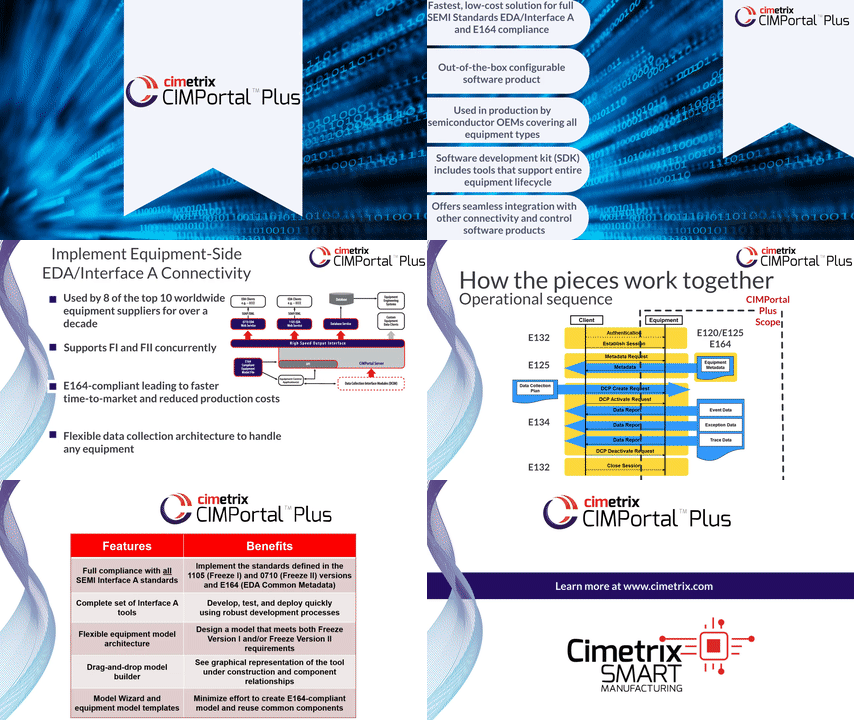 The Cimetrix Connectivity Group, part of PDF Solutions, has been directly involved with the development and implementation of the EDA standards from the beginning. The company developed CIMPortal Plus specifically to help equipment makers support both versions of the EDA/Interface A standards—Freeze Version I (1105) and Freeze Version II (0710)—and it has now been deployed in every type of wafer fabrication process equipment. As a result, CIMPortal Plus is the recognized global market leader for EDA connectivity among semiconductor equipment suppliers.
Moreover, CIMPortal Plus directly supports the SEMI E164 Specification for EDA Common Metadata (for an in-depth look at this topic, please view the video "E164 - EDA Common Metadata" and the presentation “The Power of E164”). The E164 standard was developed to encourage companies using EDA interfaces across the industry to provide a more common representation of equipment metadata based upon the SEMI E120 Common Equipment Model and E125 Equipment Self-Description specifications. Developers can use the Metadata Conformance Analyzer (MCA), available from the ISMI web site, to validate the equipment models they generate.
Equipment suppliers use the CIMPortal Plus software to implement an EDA interface in the minimum amount of time and cost. They especially like the many features CIMPortal Plus offers for equipment model development, which include an easy-to-use GUI with Visual Studio-style property windows and drop-down menus for drag-and-drop model building.
Complete EDA/Interface A Connectivity Solution
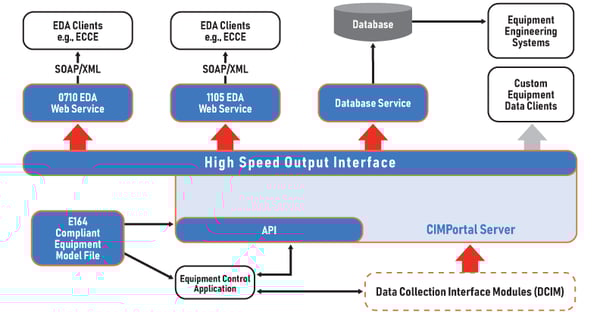
The CIMPortal Plus software is part of the complete Cimetrix EDA/Interface A connectivity solution that supports both the equipment-side and the client-side implementation of SEMI standards. Other Cimetrix products that support EDA development and implementation include:
- EDAConnect™ software to enable semiconductor factories to gather data from wafer processing and testing equipment. This data is vital for identifying opportunities to reduce costs, improve quality, and increase productivity.
- ECCE™ Plus (Equipment Client Connection Emulator) EDA reference client with an easy-to-use Graphical User Interface, used for testing the connection and verifying messages. Cimetrix developed the original ECCE software under contract with SEMATECH, and have added significant enhancements to support unit testing of EDA interfaces during their implementation. ECCE Plus is included with the purchase of CIMPortal Plus.
Once the EDA interface is completed for a piece of manufacturing equipment, multiple EDA clients implemented by the factory can simultaneously establish sessions with the CIMPortal Plus server, define Data Collection Plans, and receive the generated Data Collection Reports. After deployment, the E132 authentication, message security and diagnostics features are configurable through the CIMPortal Plus Control Panel.
Factories can use the data gathered through EDA interfaces for fault detection and classification (FDC), run-to-run advanced process control, equipment health monitoring, chamber/tool matching, predictive maintenance, virtual metrology, e-diagnostics, and many other equipment-related analytical applications.
We are available to support your project
When you use one of our products, our goal is to allow you to control your own destiny. You get our dedicated, passionate support throughout the entire development process. We recommend product training to get your team up to speed quickly. If needed, we also have engineering personnel to work with you on project planning, engineering design and initial deployment.